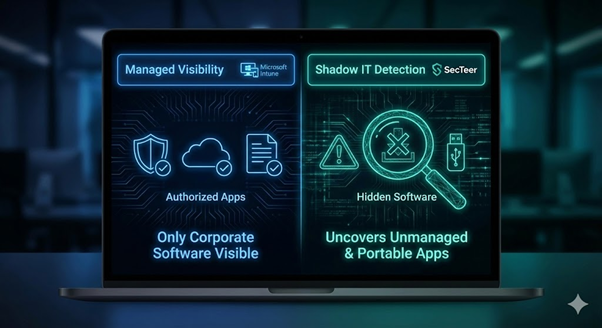
Microsoft Intune has become the cornerstone of modern device management. However, while it is a powerful tool for administration, relying on it alone often leaves critical security gaps. To achieve true software vulnerability management and meet modern compliance standards like NIS2, you need to look beyond standard features.
We have made it easy for you to find exactly what you are looking for. Click on the links below to jump to a section that interests you:
What is Microsoft Intune? | Key Features & Capabilities | The Limitations of Microsoft Intune | How SecTeer Closes the Gaps | FAQ
What is Microsoft Intune?
As a vital part of the endpoint Microsoft ecosystem, Intune software ensures that employees can work securely from any location while IT maintains control over the applications they use.
Key Microsoft Intune Features and Capabilities
What are the Limitations of Microsoft Intune?
While Microsoft Intune is an industry-standard for device management, it is not a “silver bullet” for cybersecurity. To achieve true cybersecurity risk assessment and NIS2 compliance, IT leaders must address three primary gaps where Intune falls short:
1. The Visibility Gap: What Intune Can’t See
The biggest disadvantage of Intune is that it is fundamentally designed to manage what it has deployed. It provides excellent telemetry for “managed” assets, but it is often “blind” to:
2. Operational Complexity & Fragmented UI
As noted in many technical reviews, Intune has a steep learning curve. The administrative interface is extensive and can feel fragmented, often split between legacy and newer portals. For IT teams, this leads to:
3. The Hidden Liability: Closing the 3rd Party Verification Gap
While Intune manages Microsoft updates effectively, third-party patching remains a significant hurdle. Many organizations try to solve this by using external catalogs, but this introduces a new risk: Lack of Verification. Without SHA256 checksums and AuthentiCode signatures, you risk deploying compromised code into your environment.
For a deeper look into the specific operational challenges of 3rd party patching within the Microsoft ecosystem, read our detailed analysis here.
How SecTeer Closes These Gaps
SecTeer doesn’t replace Intune; it strengthens compliance alongside it.
Reveal Your True Attack Surface
Microsoft Intune is an excellent foundation, but SecTeer provides the visibility and automated precision needed to stay secure in a complex threat landscape. By combining Intune’s management power with SecTeer’s vulnerability intelligence, you eliminate blind spots and ensure a Secure Software Deployment process.
FAQ
Accordion Content
It manages and secures your organization’s devices and apps from the cloud, ensuring that only compliant devices can access sensitive corporate information.
Standard Intune is primarily designed to track software it has deployed itself. It often struggles to provide visibility into unmanaged “Shadow IT” or portable applications installed by users.
SecTeer adds a layer of curated detection to find unmanaged software and provides a library of verified, pre-tested 3rd party patches that are automatically injected into your Intune environment.
Microsoft Intune has a steep learning curve and a fragmented user interface. This administrative complexity often leads to operational friction and increases the risk of security misconfigurations that can leave endpoints vulnerable.